Bringing Dell and EMC together for one of the biggest IT mergers in history means extensive integration efforts that will span many months. But the key challenge our team faced even before the merger was complete, was one of the critical business process integrations leading to the launch of Dell Technologies in the marketplace.
We were charged with integrating EMC and Dell’s dual Saleforce.com systems to provide thousands of sales professionals seamless access to data and opportunities across both companies on Day One of our groundbreaking merger. We wanted our sales teams from each company to be able to sell products from both as we officially launched Dell Technologies.
What’s more, bridging the gap between the disparate Salesforce systems was needed to avoid the error-prone inefficiencies of sales reps, account managers, and finance professionals manually reconciling and reporting on data from disconnected systems.
Round peg, square hole
Both companies had different architecture and application programming interface (API) practices in their separate instances of Saleforce.com. Their product data heirarchy was laid out differently. The business process around leads, opportunities and accounts creation was customized for the needs of the respective companies. Melding them into a single set of information that enabled the cross-selling of the many complementary products across storage, server, virtualization and PC was a challenge right out of the gate.
With data format, app and cultural differences, at times it felt like our three-member Enterprise Integration Services team was trying to put a round peg into a square hole. Adding to the challenge was the fact that we had to make the integration happen in six to eight weeks.
We needed an enterprise integration platform that would be intuitive, simple to use, fast and scale to our needs. One that had built-in connectors to bridge applications so we wouldn’t have to write custom code to connect data elements.
We had an integration cloud platform that had proven effective in uniting applications and data in the more than half a dozen acquisitions that Dell had completed before its merger with EMC—Dell Boomi. Boomi is a multi-tenant, cloud-based application integration platform that has a broad range of built-in connectors to more easily integrate applications and data in IT environments. It serves as a connection between applications whether they are on-premises or off and then manages the integrations in the cloud.
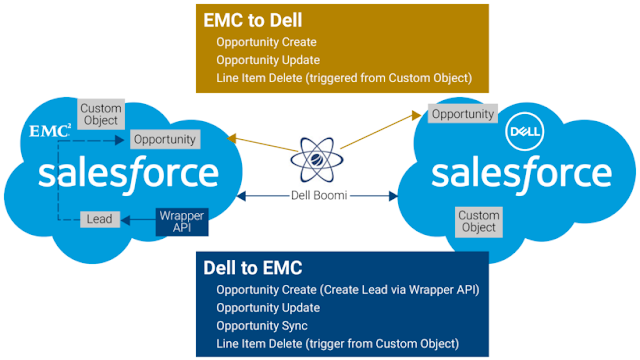
We were charged with integrating EMC and Dell’s dual Saleforce.com systems to provide thousands of sales professionals seamless access to data and opportunities across both companies on Day One of our groundbreaking merger. We wanted our sales teams from each company to be able to sell products from both as we officially launched Dell Technologies.
What’s more, bridging the gap between the disparate Salesforce systems was needed to avoid the error-prone inefficiencies of sales reps, account managers, and finance professionals manually reconciling and reporting on data from disconnected systems.
Round peg, square hole
Both companies had different architecture and application programming interface (API) practices in their separate instances of Saleforce.com. Their product data heirarchy was laid out differently. The business process around leads, opportunities and accounts creation was customized for the needs of the respective companies. Melding them into a single set of information that enabled the cross-selling of the many complementary products across storage, server, virtualization and PC was a challenge right out of the gate.
With data format, app and cultural differences, at times it felt like our three-member Enterprise Integration Services team was trying to put a round peg into a square hole. Adding to the challenge was the fact that we had to make the integration happen in six to eight weeks.
We needed an enterprise integration platform that would be intuitive, simple to use, fast and scale to our needs. One that had built-in connectors to bridge applications so we wouldn’t have to write custom code to connect data elements.
We had an integration cloud platform that had proven effective in uniting applications and data in the more than half a dozen acquisitions that Dell had completed before its merger with EMC—Dell Boomi. Boomi is a multi-tenant, cloud-based application integration platform that has a broad range of built-in connectors to more easily integrate applications and data in IT environments. It serves as a connection between applications whether they are on-premises or off and then manages the integrations in the cloud.

Our previous integrations were nowhere near the scale of the Dell EMC Salesforce.com project. We set the goal of designing the system to handle 5x the expected volume. With 200,000 messages a day as the baseline, we laid out the architecture that was able to support a million messages a day.
We worked with the business to assimilate the data, review business rules, establish use cases and test the consolidated data sets. Ultimately, with weeks of preparation and a two-day move into the integrated platform, our sales teams were able to function as a united force on Day One. The Salesforce.com integration was a huge success!
Building a Connected Business: Lessons learned in the Salesforce integration
If your organization is facing a business integration or merger, here are some strategies we learned along the way that might make the process a bit easier:
◈ Use an iPaaS solution—An Integration Platform as a Service, like Boomi, provides a comprehensive solution for moving, managing and governing information across data applications and data repositories.
◈ Set up a change control process—As with any project, tracking and documenting change management is essential.
◈ Tap subject matter experts (SMEs)–It is extremely important to utilize the knowledge of those on both sides of your integration effort who understand specifics of the business processes and the use cases you are dealing with—for instance, the Quote Creation Process and how it interfaces with SFDC. Guidance from SMEs and the actual end users i.e. sales reps in this case, will save your team the time it takes to get to learn the different processes and avoid costly mistakes.
◈ Clarify legal restrictions up-front—Since our team began working with both companies’ Salesforce systems before the merger was legally completed, we were uncertain what data and tools were accessible and shareable between both sides at what point in time. However, we did discover in post-merger discussions that there we had more access than we thought. It is worthwhile to have discussions with your legal team ahead of time to clarify what is restricted and what is not– to avoid being overly restrictive on data and tool access.
◈ Clean up your data—Integrating data in your iPaaS project is an opportune time for data owners on both sides to clean up their data. Make sure that the content and applications that are being moved into a unified platform are only those that are needed. Working with clean data will make the process faster and more efficient.
Finally, if your organization is facing the challenges and complexities of an iPaaS project to integrate systems, data and applications—most likely complicated by different corporate cultures—take heart. We found that most people—from managers to individual contributors—did their best to help make this collaboration a success despite the hurdles we faced. It can be done!


 Posts
Posts

